
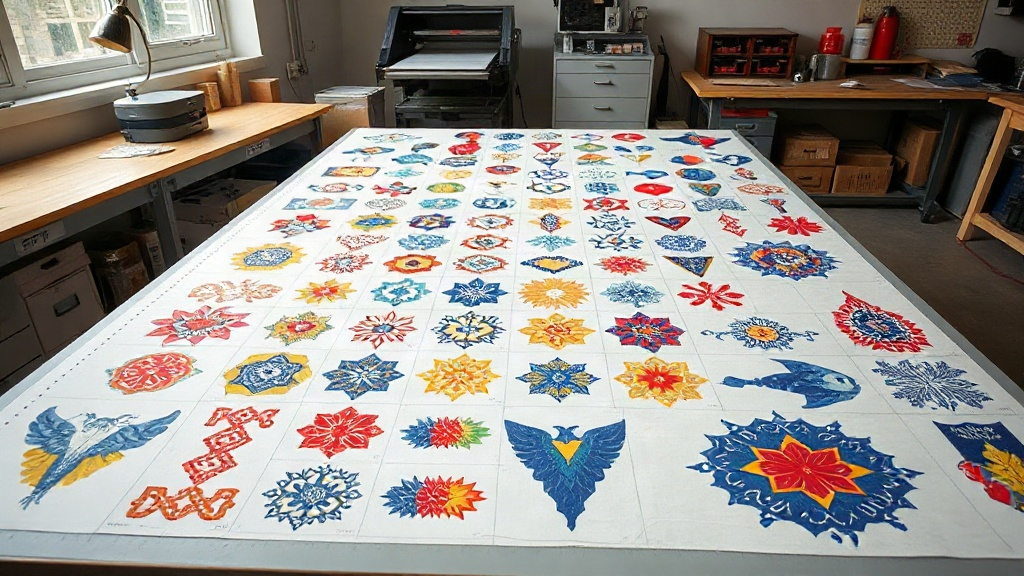
If you're in the custom apparel business, you've likely heard about DTF printing. It's a game-changer for producing vibrant, durable transfers on demand. But as your order volume grows, you quickly realize that printing each design individually is a recipe for wasted time and material. That's where the DTF gangsheet comes in. A gangsheet is essentially a large sheet packed with multiple designs, allowing you to print many transfers in one go. In this guide, we'll dive deep into gangsheets: what they are, why they matter, and how to use them to supercharge your production.
What Exactly Is a DTF Gangsheet?
A DTF gangsheet is a single sheet of DTF film that contains multiple designs arranged efficiently. Instead of printing one design per sheet, you nest many designs together to maximize the use of space. This approach is similar to gang printing in offset lithography, where multiple jobs are combined on one plate. For DTF, gangsheets are typically created using RIP software that automatically arranges your artwork. The result is a sheet that can be pressed onto multiple garments after cutting apart the individual transfers.
The primary benefit? Efficiency. By filling a sheet with as many designs as possible, you reduce the amount of wasted film and powder, and you drastically cut down on printer time. If you're running a business, that translates directly to lower costs and higher throughput.
Why You Should Be Using Gangsheets
Let's break down the advantages:
- Time savings: Printing one large sheet is much faster than printing dozens of small ones. You set up once, print once, and you're done.
- Material savings: DTF film and powder are not cheap. Gangsheets minimize waste by using every inch of the sheet.
- Cost efficiency: Less waste and faster production mean lower cost per transfer, improving your profit margins.
- Consistency: When you print multiple designs on the same sheet, they go through the same curing and powdering process, ensuring consistent quality.
- Scalability: As your orders increase, gangsheets allow you to scale up without proportional increases in time and cost.
If you're not using gangsheets yet, you're leaving money on the table.
How to Create a DTF Gangsheet
Creating a gangsheet involves a few key steps. You'll need the right software and a bit of planning.
Step 1: Gather Your Designs
Collect all the designs you need to print. Ensure they are in a high-resolution format, preferably PNG with transparent backgrounds. If you have vector files, even better, as they can be scaled without loss of quality.
Step 2: Choose the Right Software
You can use dedicated RIP software like Cadlink Digital Factory, or general-purpose layout tools like Adobe Illustrator. Many DTF printer manufacturers provide their own software. The key is to have software that allows you to import multiple images and arrange them on a canvas that matches your film size.
Step 3: Arrange Designs Efficiently
This is where the magic happens. You want to nest designs as tightly as possible without overlapping. Leave a small gap (2-3mm) between designs for easy cutting. Rotate designs if it helps to fit more. Consider the size of your film: common widths are 13", 17", and 24". The length can be as long as your printer allows, often up to several feet.
Step 4: Add Registration Marks
If you're using a cutter, add registration marks so the cutter can recognize where each design is. This is crucial for automated cutting.
Step 5: Print, Powder, and Cure
Once your gangsheet is laid out, print it using your DTF printer. Then apply hot melt powder evenly, shake off excess, and cure the sheet in an oven or with a heat press. Follow your specific powder and film instructions for temperature and time.
Maximizing Efficiency: Tips from the Trenches
After years of working with DTF, I've picked up a few tricks that can save you hours and headaches.
Use a Template
Create a template in your software with pre-set margins and guides. This speeds up the layout process and ensures consistency.
Group Similar Sizes
If you have many designs of similar size, group them together. This makes cutting easier and reduces the risk of errors.
Keep a Library of Common Designs
If you frequently print certain designs (like logos for regular clients), keep them in a library. You can quickly drag and drop them into new gangsheets.
Optimize Powder Application
Excess powder can contaminate your prints and waste material. Use a powder shaker or a sieve for even application, and always shake off excess before curing.
Test Your Settings
Every printer, film, and powder combo behaves differently. Run test prints to dial in your settings for optimal color vibrancy and adhesion.
Common Mistakes to Avoid
Even seasoned pros make mistakes. Here are some pitfalls to watch out for:
- Overcrowding: Packing designs too tightly can cause them to bleed into each other. Leave adequate space.
- Forgetting to Mirror: DTF transfers are typically applied face down, so you must mirror your designs before printing. Most RIP software does this automatically, but double-check.
- Inconsistent Powdering: Uneven powder leads to poor adhesion and washability. Be meticulous.
- Improper Curing: Under-curing means the transfer won't stick; over-curing can burn the design. Follow the powder manufacturer's recommendations.
- Not Using Registration Marks: If you're cutting with a machine, registration marks are essential for accuracy.
Frequently Asked Questions About DTF Gangsheets
What is the maximum size for a DTF gangsheet?
The maximum size depends on your printer and film roll. Common film widths are 13, 17, and 24 inches, and the length can be as long as your printer supports, often up to 100 feet or more. However, practical limits exist based on handling and curing equipment.
Can I use any DTF film for gangsheets?
Yes, but you'll get the best results with high-quality film designed for your printer. Cheaper films may cause jamming or poor ink adhesion. Always test new film before committing to a large gangsheet.
How do I price DTF gangsheet transfers?
Pricing should cover material costs (film, ink, powder), labor, and overhead, plus profit. Calculate your cost per square inch and multiply by the area of each design. Many printers offer tiered pricing based on quantity.
Do I need a special printer for gangsheets?
No, any DTF printer can print gangsheets. The key is to have software that allows you to arrange multiple designs on one canvas. Some printers have a maximum print length, so check your specs.
How do I cut a DTF gangsheet?
You can cut manually with scissors or a guillotine, but for efficiency, use a vinyl cutter with a contour cut feature. Add registration marks to your gangsheet so the cutter can detect each design's boundaries.
Final Thoughts
Mastering the DTF gangsheet is a milestone for any DTF printer. It signals that you're moving from hobbyist to professional, optimizing your workflow for speed and profitability. Start small: create a gangsheet with a few designs, refine your process, and gradually increase complexity. Before long, you'll wonder how you ever managed without them.
Remember, the goal is to work smarter, not harder. With gangsheets, you can take on more orders, reduce waste, and keep your customers happy with fast turnaround times. So fire up your RIP software and start ganging today.